![TIL | 10.21.금 [머신러닝 / Django]](https://img1.daumcdn.net/thumb/R750x0/?scode=mtistory2&fname=https%3A%2F%2Fblog.kakaocdn.net%2Fdna%2FciZRgk%2FbtrPoygsv2Z%2FAAAAAAAAAAAAAAAAAAAAAJs6nToDt7vt4VYmhVlek0-2rO5WmHuESzBo2SDrMNeX%2Fimg.png%3Fcredential%3DyqXZFxpELC7KVnFOS48ylbz2pIh7yKj8%26expires%3D1767193199%26allow_ip%3D%26allow_referer%3D%26signature%3D%252FN%252FqZ6TObyJxb1tWuCuFRZijWjQ%253D)
(B2 | 3_team_project)
- 프로젝트 피드백 및 수정사항
[코드 컨벤션]
- https://github.com/kbm1933/B2_IIEII_ML/blob/main/yolo_code/detect.py#L15 함수에서 코드스타일(개행)을 지켜주는 것이 가독성에 좋다.
def get_img(idx):
    model = torch.hub.load('ultralytics/yolov5', 'custom', path='yolo_code/last.pt', force_reload=True)
    imgmodel = FileUpload.objects.get(id=idx) #업로드 한 이미지

    img_bytes = imgmodel.imgfile.read()
    img = im.open(io.BytesIO(img_bytes)) #jpg로 파일 open

    img2= np.array(img) #jpg >> numpy array로 변경

    results = model(img2)
    detect = results.pandas().xyxy[0] #좌표 얻기
    print(detect)
    results.save()

    final_img = im.fromarray(img2) #numpy array >> jpg로 변경

    final_img.save(f'media/YOLO/result{idx}.jpg', "JPEG")

    yolo_url = (f'YOLO/result{idx}.jpg')

    detect_result = results.pandas().xyxy[0].to_numpy() # 인식한 결과의 정보 : 확률과 어떤 과일인지 클래스 이름
    print(detect_result)
    confidence = int(detect_result[0][4] * 100)
    fruit_cls = detect_result[0][6]

    YoloResult.objects.create(imgs=yolo_url, confidence=confidence, fruit_class=fruit_cls)
    return()
- 선언되고 사용되지 않는 코드가 보여지는데, 이런 코드들은 정리해 주시면 좋다.
[models.py]
- foreign key와 manytomany field 등 다양한 model 설계 방법을 익히고 이를 models.py에 적용해보기.
class FileUpload(models.Model):
    title = models.CharField(max_length=100)
    content = models.TextField()
    imgfile = models.ImageField(null=True, upload_to='images/', blank=True, editable=True)
    user = models.ForeignKey(User, on_delete=models.CASCADE)

    def __str__(self):
        return self.title


class YoloResult(models.Model):
    imgs = models.ImageField(null=True, upload_to='images/', blank=True, editable=True)
    fruit_class = models.TextField(null=True)
    confidence = models.TextField(null=True)


# FileUpload에서 받은 이미지를 YoloResult에서 ForeignKey로 받아서 머신러닝 학습 후 다시 보내주는 작업 해볼 필요 있음
[머신러닝]
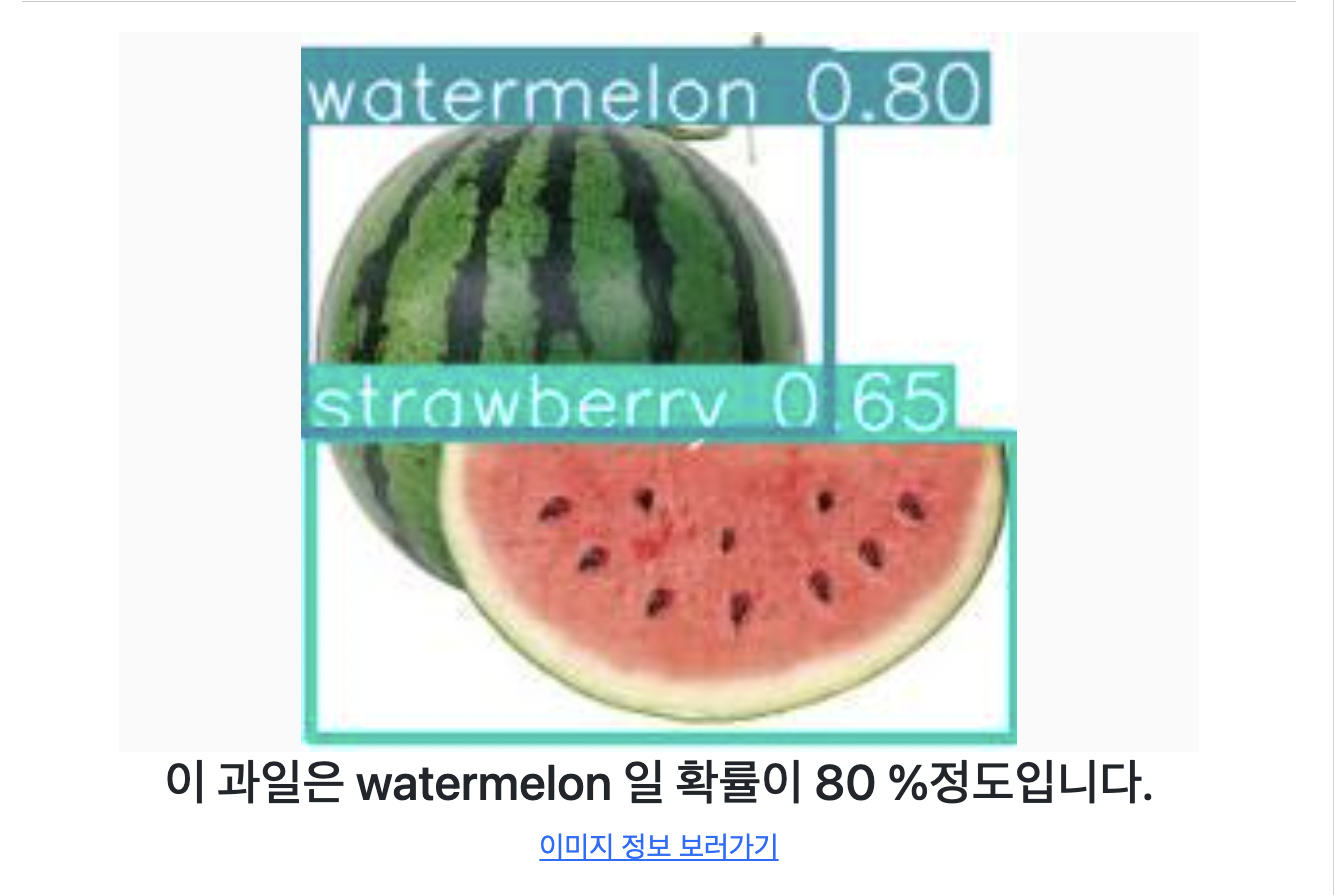
- 수박이 수박, 딸기 두가지로 나오는 경우 기준점(threshold)을 설정해서 해당 기준 이하일 경우에는 무시하는 방법으로 모델을 사용할 수 있으니 참고해보자.
[github]
- readme를 조금 더 상세하게 + erd와 api 명세까지 추가해주면 좋다.
'woncoding > TIL' 카테고리의 다른 글
| TIL | 10.25.화 [Django : DRF] (0) | 2022.10.25 |
|---|---|
| TIL | 10.24.월 [Django : DRF] (0) | 2022.10.24 |
| TIL | 10.20.목 [머신러닝 / Django] (0) | 2022.10.20 |
| TIL | 10.19.수 [머신러닝 / Django] (0) | 2022.10.20 |
| TIL | 10.18.화 [Django] (0) | 2022.10.19 |